Telegram Downloader V2.1.* New version instructions
🎉 What's New in v2.1.1
✨ Brand new interface design
We have completely revamped the plug-in's interface to bring a more modern and intuitive visual experience.
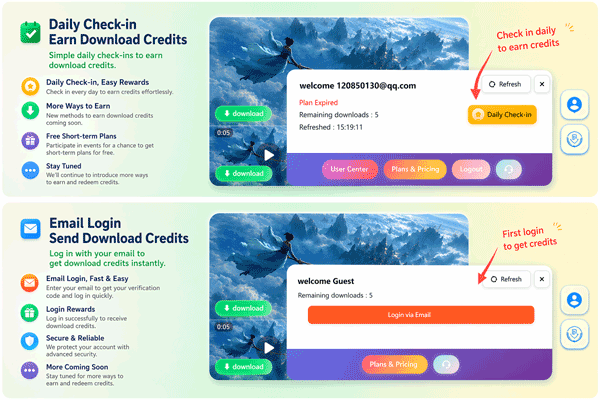 ###Main improvements:
- New icon system: Redesigned icon style, clearer and easier to identify
- Daily check-in function: After logging in, you can participate in daily check-in and easily obtain free download quota
- Simpler user panel: clearly displays account status, remaining downloads and plan information
🔐 Login method upgrade
In order to improve security and convenience, we have upgraded the login method from Link login to Email verification code login.
New login process:
- Click the "Login via Email" button
- Enter your email address
- Check the verification code email
- Enter the verification code to complete the login
Advantages:
- More secure: The verification code is valid once, eliminating the risk of link leakage
- Faster: No need to wait for a long link in the email, enter the 6-digit verification code to log in
- More reliable: Avoiding the problem of links in emails being blocked or invalid
⬇️ Brand new download experience
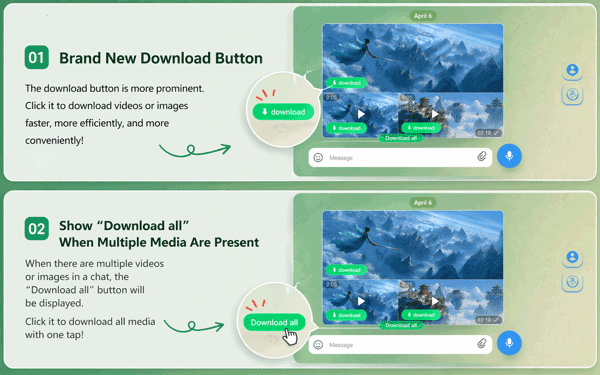 ### 1. New download button
- Buttons are more eye-catching, with new colors and icon designs
- Download videos or pictures with one click, making the operation faster and more efficient
2. "Download all" One-click batch download
- Automatically display the "Download all" button when there are multiple videos or pictures in the chat
- Download all current media files with one click, no need to click one by one
🎛️ Brand new menu button and batch download panel
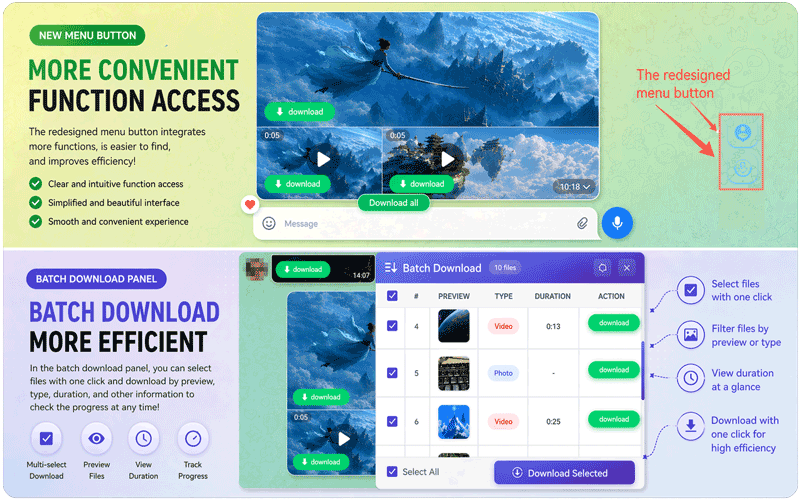 ### Redesigned menu button
- Integrated more functional entrances, making operation more convenient
- Clearer visual hierarchy, functions are clear at a glance
New batch download panel
- Multiple selection function: Supports batch selection of files that need to be downloaded
- File Preview: Supports previewing file content and downloading after confirmation.
- Information Display: Clearly display key information such as file type, duration, etc.
- Progress Tracking: View the download progress of each file in real time
- One-click download: After checking, click "Download Selected" to download in batches
⚡ Performance optimization
This update deeply optimizes the plug-in:
- Loading speed improvement: The resource loading logic is optimized, and the plug-in startup and interface rendering speed are significantly improved.
- Reduced Resource Usage: Reduced memory and CPU usage, making web browsing smoother
- More stable downloads: Optimized the download management mechanism, making large file downloads more stable and reliable
🚀 Try it now
The new version of the plug-in has been automatically updated. Refresh the Telegram Web page to experience all new features!
If you have any questions or suggestions, please visit our official websitefor help.
*Thank you for supporting Telegram Video/Photo Downloader! *